Unknown Google Chrome’s Language setting to sth known!

It has taken almost 3hr out of my life to figure out an appropriate language for my Google Chrome, when i am lost in between a noodles like alphabet of some other language what i donttttt knooooooooow!

I am considering you blind for a while (Sorry to say but i cant give example of BLACK movie since i dont understand HINDI)

put this link to your Google chrome navigation :
chrome://settings/languages

take your mouse pointer to the second blue column, and there will be some helping comment below your pointer and figure out a non-noodles one and select it!!

go to the next column, click on the first one!

Restart your Chrome!

and thats it!

It helped! I know!

I don’t speak Greek! But it may happen to look like GRREK!

For those who does not understand greek,  please follow the link. There is a series of pic, to guide you!

Basic Diodes

Electric diode has two terminals and this two terminals make the diode call ‘di‘-‘ode‘, which is translated as it “two” “paths”.

The characteristics of a diode can be represented by a resistor and conductance. Basically diodes   make the electric flow one direction discarding the current flow coming from other directions. An Ideal diode follows this characteristic very strictly.
If diode is in forward bias ideal diode simply let the current flow otherwise not. Forward biased ideal diode does not have any voltage difference across it.

Example:
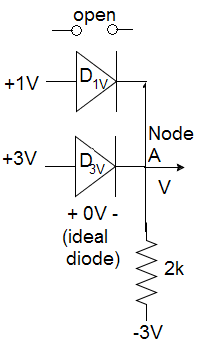
In this example we have to determine V, and we will consider both of the diode as ideal diode.

We already know that ideal diode does not drop any voltage and as long as current is going forward diode should be open but the real problem of this problem is, at the same time Node A can’t be 3V and 1V, so either of the diode is cut  off.

Now calculate the voltage differences:
If we consider 1V as active then, the voltage differences is: 1V – (-3V) = 5V
If we consider 1V as active then, the voltage differences is: 3V – (-3V) = 6V,
for 3V the voltage difference is huge so, for this case we will consider that diode (D3V) as conductive and other (D1V) as cut offed.

Now applying KVL: ( 3V – (-3V) ) =2k i
=> i = 6/2k
=> i = 3mA

Idol diode is what we wanted the diode to work like, but in reality idol diode does not exist, the practical characteristics of a diode looks almost like exponential.

I=Is(e VD / (n VT) – 1)
I=Ise VD / (n VT)

Where,
I is the diode current,
Is is the reverse bias saturation current (or scale current),
VD is the voltage across the diode,
VT is the thermal voltage, and
n is the ideality factor

V is can be described with the equation, V =kT/q
in room temperature V =25mV.

Example:
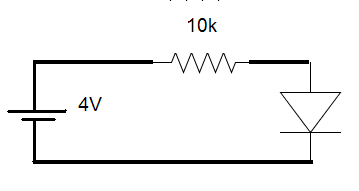
Now if it is said that thermal voltage, VT =25mV, saturation current, Is= 10 -12 we have to calculate diode current when diode voltage, VD =0.5V!

From diode equation,I = Ise VD / (n VT)
I = 10 -12 e 0.5/ (1 x 25m)
I = 4.85 x 10 -4 A

In reality most of the case across the diode we get few more or less 0.7V.
In constant voltage model without taking help from our previous equations, we consider that Voltage across Si diode is always 0.7V, and for Ge it is 0.3V.

Example:
Now we have to determine i and V of the following circuit…

Node analysis may help us most of the time when we’ll deal with these type of problems.

at Node A:
(5-0.7)/10k + (-5-0.7+0.7)/5k = i
=>i = 0.43mA – 1mA
=>i = -0.57mA,

i is negative so diode is reverse biased, and no current will go through this. i=0

Applying KVL to rest of the circuit…………………………………..

(10k+5k) i2 = (5-(-5)-0.7)
=>i2 = 0.62mA

So, V = i2 5k – 5
= 0.71 x 5 -5
=-1.45

Semiconductors and p-n junction

Does not mater how powerful a electrical devices can be, at the time when electric current does not flow throw it, it dies and gets its life back when electricity flows. Everything in the electrical world survives with the flow of electron. If we can somehow control the flow of electron it would be a great deal in terms of electronics. But unfortunately the copper wire or other conductive maters that we use, we can not possibly change its conductivity level according to our needs.

To make electricity flow we need suitable maters like Cu, Ag. These atoms has only one electron at its last shell which is not a unstable form (neither it has a pair nor it fulfills duplate/octave) and this electron acts as if it is not bound to any atom at all. This free electron moves around the mater freely, that makes the conductor really conductive as well as stable. But we may need a little amount of electrons to flow, but conductors atom is already in a stable form (full filled octave) so what can be done? We need a thing where we can change its conductivity what we want.

Semiconductors can be its solution! Semiconductors like Si, Ge, has 4 electrons at its last shell, usually Si stays in a lattice (so do Ge). Silicon atom has four electrons which it can share in covalent bonds with its neighbors.

You may argue that Semiconductor has no free electrons like Conductor does, so how can it be a solution? and your argument is true as it is intrinsic Si or Ge lattice, it can conduct very little amount of current. To make it a SOLUTION we need few alloy of impurity to add with it.

If we can replace a Si (of 4 electrons in outer shell) with a B (3 electron at its outer shell), so now both in Si and B’s outer shell we have 7 electrons, 1 more electron is needed for its stable form. So we can say it as a hole. This is called Positive-type or P-Type Semi conductor. So when ever current is passed through this, first of all it will fill up the holes and then rest will go. This way we can reduce conductivity. One more thing to be mentioned, usually B2H6 gas to diffuse boron into the silicon material.

Now again,
If we can replace a Si (of 4 electrons in outer shell) with a Sb (5 electron in outer shell), so now both in Si and Si’s outer shell we have 8 electrons, which is stable but Sb has 9 electron, which is 1 more than the stable form and for the sake stability it can easily be free. So basically we are getting one more free electron. This is called Negative-type or n-type Semi conductor. So when ever current is passed through this, this free electron will flow. This way we can increase conductivity. One more thing to be mentioned, Phosphorous may be added by the diffusion of PH3 gas.

So adding a little percentage of foreign atoms in the crystal lattice of silicon/germanium produces a dramatic change in their electrical properties, producing n-type and p-type semiconductors and this is known as doping. Depending on the conductivity we want it to be it takes 6-12 hour and temperature of above 600° K.

By combining p and n type we, can make a p-n junction, which also illustrate new properties.

P-type has huge Holes (deficiency of electron), and on the other side N-type has huge electrons. So leaving a hole in N-type few of the electron gradually moves to P-type (which is known as diffusion). It makes P-Type negative and on the other hand due to that hole N-type become positive. But as long as electromagnetic coulomb’s force created through the movement of electron, it opposes the next electron to move. This newly observed electron and holes are considered as Depletion zone. After a certain time it reaches its Equilibrium. The more the size of this Depletion zone increases the less electron it flows. This is what happen when p-n junction is not connected with any voltage sources. It is also known as Zero-Bias.

Now when we connect a positive Voltage source with P-type and make N-type to the ground then electron and holes move toward the junction, the distance between depletion zone decreases and so do coulombs force. This applied voltage helps to overcome coulomb force and as electrons and so with a little resistance electron will be forwarded and this is also known as Forward Bias.

But if we connect a negative Voltage source with P-type and make N-type to the ground then electron and holes pulled away from the junction. As holes and electrons increases, the distance between depletion zone increases and so do coulombs force. So this increases the voltage barrier causing a high resistance to the flow of charge carriers, only minimal electric current can cross this p–n junction. This is called Backward Bias.

So after a certain Voltage, Forward Bias works like closed circuit and Backward Bias works like Open Circuit…

Orientation with Alternative Currents!

UP-DOWN-UP-DOWN-UP-DOWN! Life has its own rhythm to go.  In the run of life cycle it has ups and downs maybe that makes life to be more interestingly complete. It changes its direction anytime.

AC current also have a nature of changing its direction after a certain up its obvious for AC current/Voltage to face a down and then if we let it to continue it would repeat/replicate that same up-down cycle. The transformed (maybe by the induction of the coils as Faraday’s Law of Electromagnetic Induction states) power of the huge current produced in the power plants that the power generation company supplies us is theoretically a sine wave. (Practically its more naughty and dirty in nature and in country like us (by not putting U and S capital, i meant: our Bangladesh), PDB also sometime provides DC current, which has an ZERO AMPERE of constant currents, yes i am talking about the load shedding which neither alters its direction for hours).

AC current or voltage may not look like our so called sine wave (equation: x = Sin y), it may also look to be more like square or triangular waves. But as in square form or in the triangle form they are also  alternating its direction They are AC currents as well. And another thing is, square or triangle waves can also be represented by summation of multiple sine functions.

Of a waveform the time it takes to make a single of that replicated part is the Period(T) of that wave. The time it takes for each of this cycle is called frequency(f). f=1/T

at T time it travels 2∏ circular path
so at 1s it travels  2∏/T path,
so circular velocity ω=2∏/T

when current starts to increase from 0V or 0A,

at any time of t, instant voltage will be:
v = Vmax  sin ( ωt)= Vmax sin ( 2∏/T) = Vmax sin ( 2∏f)

instant voltage will be:
i = Imax sin (ωt) = Imax sin ( 2∏/T) = Imax sin ( 2∏f)

if  voltage/current is greater than the equilibrium voltage or current, then the angle it need:

v = Vmax sin ( ωt + θ ), θ is the shift of angle from 0rigin .

RMS (Root Mean Square) Voltage is the avg Voltage of a AC source produce in its each cycle that we assume as direct source.

To measure RMS we have to follow 3 steps: 1. (S)quare 2.(M)ean 3.(R)oot.

At the interval of t1 and t2, Mean Square Voltage Vms ,
Vms = ∫Vmax sin² (ωt ) dt/(t2-t1)=Vmax/(t1-t2) ∫ ((1 – cos (2ωt )/2 )dt
=Vmax/2(t2-t1) ∫ (1 – cos (2ωt ))dt
=Vmax/2(t2-t1)  (  (t2-t1) – sis (2ω (t2 – t1) )/2ω)

but since the interval is a whole number of complete cycles, the sin  terms will cancel out, leaving:

Vms = Vmax (t2-t1) /2(t2-t1) 

Rooting both side:
Vrms = Vmax/√2

This is enough that i have learned as an introduction of the very beginning of AC!

Now i want to scrap this blog post with a little word of humbleness, to a spacial friend who kept visiting on my blogs even at the time infect when there was nothing  to visit at all (I also doubt! If it still has anything or not!) and elevated my visit counter to reach 200+. But the irony is after the bell of 200th visit rung he is like “never coming back once again” and my visitors list has given up to go increase :P.

Just kidding!

And thankyou all who have ever contributed to this 200+ visits, This is ALOT to me!

and…

The truth is, i am not the ONLY one who reads my blogs! 😉

[java] “Why this blank Scanner sh*t after each time of taking int or double as input?”

Well, by using java.util.Scanner we can take input from the user, it can be String, it can be integer, it can be double, even it can be a line!

to use java util.Scanner, we first import java.util.* package, then we declare an object of Scanner class:

Scanner sc = new Scanner (System.in);

Since System.in is an input stream, above declared Scanner will takes all necessary inputs from its input streams and System.in let the user give input streams through the system (maybe keyboard).

Various types of inputs can be taken as i have mentioned, can be taken via various next methods:

For example:

next() method is used to take input a word, it starts taking input from the streams and does not not stop until it spots character  a ‘ ‘ (space)!

Example: if the given input of the user is: “yo man”
then next() method will return “yo “, cause, after yo it spots a space ” ” and it refrains from taking any other inputs but in input stream still it has “man”  left next to “yo “, so if we again let next() method get called, then as input stream already has streams, so that next() won’t ask the user to give another input but it would take from the next input stream and so it would return “man” !

nextLine() takes input from the user until it reach an Enter. We have learned that <Enter> is nothing but a spacial character.

Example: users given input is: “yo man” and then press Enter
“How are you” and then press Enter
then nextLine() method will only return “yo man”, cause, after “yo man” it spotted an <Enter> and it refrains from taking any other inputs but in its input stream “How are you <Enter>” is still left!

nextInt() method takes integer inputs from the use and suppose now we call nextInt() method then it will start taking inputs from input stream which was left  before (i mean “How are you <Enter>”) and it would fail to get an Integer so
java.util.InputMismatchException will get thrown.

Now we will see a practical problem that we face due to this sort of thing:

import java.util.*;
public class Student{
Scanner sc=new Scanner(System.in);
System.out.print("Serial no: ");
int Serial =sc.nextInt(); //1st input from the user
System.out.print("Name: ");
String Name = sc.nextLine(); //won't ask the user to give an input
}
}

Why? Why? Why?
At the time when user gives an Integer when “Serial no: ” is asked, the user presses an integer number and then <Enter>.
nextInt() method returns that number and int Serial variable stores that intiger with no difficulty but in input stream <Enter> remains so at the time when nextLine() is being called (at the time when user is asked to give the “Name: ” ) it takes that <Enter> as a input from the input stream so user does not get any chance to enter the name.

Giving a blank sc.nextLine() after each sc.nextInt() can be a solution for this problem as String can hold anything.

System.out.print("Serial no: ");
int Serial =sc.nextInt(); /*user inputs a number and then presses <Enter> and int Serial stores only the number not that extra <Enter>*/
sc.nextLine(); /* it takes extra <Enter> */
System.out.print("Name: ");
String Name = sc.nextLine();

I think this blog post could be dedicated to a Friend with “Whys”, Fahim Bakhtiar, unlike any element of my so called GoodStudent class 😛 who has an unlimited amount of Wh-Questions to ask in his mind. And most probably I also fear what he would ask again regarding this issue where i will get stumbled miserably 😛 but he is always welcome as always! All the best to him!

Disclaimer: This is what i have assumed about Scanner class. Correct me if i am wrong! Suggest me good articles about this Scanner as i have got nothing.

[java] FileInputStream and Reading line by line:

The computer that we are using right now is digital electronic, it is digital because all the information inside it is represented by streams of numbers, more specifically binary numbers. From the perspective of Computer every single file is nothing but a stream of binary numbers. Still now sometimes i stare at my computer and think what not we are making it to do so but it knows nothing more than 0 and 1?  WTF! (Well, That’s Fantastic!)

Before dealing with FileInputStream first of all we have to know what FileInputStream really is.

FileInputIstream is basically a child class of InputStream. It obtains input bytes from a file in a file system. Stream classes basically deal with binary datas and in binary there is no such thing as a “line” so FileInputStream does not have any method which is related with lines.

Our objective is to read from a file line by line using FileInputStream.

First of all it’s in a different not included in java.lang package so if we will use FileInputStream we need to import java.io.* at the beginning of the class.

Scanner or BufferedReader has methods to work with lines so if we can can somehow scan/read Streams through Scanneror BufferedReader, then we can read them line by line using nextLine() or readLine() method.

Constructor Summary of Scanner
Scanner(InputStream source)
Constructs a new Scanner that produces values scanned from the specified input stream.
more…

Scanner does give us opportunity to pass a InputStream through its constructor.

Now, we need to think of a way to make an connection our given file and java.

Constructor of  FileInputStream 
FileInputStream(File file)
Creates a FileInputStream by opening a connection to an actual file, the file named by the File object file in the file system.

 throws FileNotFoundException
FileInputStream(String name)
Creates a FileInputStream by opening a connection to an actual file, the file named by the path name name in the file system.

throws FileNotFoundException

From the summary of the constructor of FileInputStream, we can easily guess  at least two way to make this linkage through the constractor:

1. FileInputStream(String name)
2. FileInputStream(File file)

1. FileInputStream(String name): i think this is the most straight forward way to do this thing. If the file we want to read and our file which we want to to read line by line are at the same directory then we can just write that files name and extension as name constractor and as this constractor throws FileNotFoundException so we also need to handle that exception.

Example: if we want to read a file named “sample.txt” then we would write:

try{
FileInputStream fileInStreamObj = new FileInputStream("sample.txt" );
}
catch (FileNotFoundException e){
System.out.println(e);

But if file which we want to to read line by line are not at the same directory then we have to write that files directory briefly and we have to use double ‘//’ in place of single ‘/’ (FYI: as ‘/’ is a escape character and you can’t store a single ‘/’ in a character veritable). Example: if we want to read a file named “sample.txt” which is located at the directory of “C:\Documents and Settings\User\Desktop\sample.txt”, then you have to write:

FileInputStream fileInStreamObj = new FileInputStream("C:\\Documents and Settings\\User\\Desktop\\sample.txt" );

try blocks confines the scope of variables, so we can put this previous piece of code inside same try  block.

Combinig all the pieces:

import java.io.*;
import java.util.Scanner;
public class ReadALineUsingFileInputStream {
public static void main (String [] args){
try{
FileInputStream fileInStreamObj = new FileInputStream("sample.txt" );
InputStream inStreamObject = ((InputStream) fileInStreamObj);
Scanner sc = new Scanner( inStreamObject );
String input = sc.nextLine();
System.out.println(input);
}
catch (FileNotFoundException e){
System.out.println(e);
}
}
}

2. FileInputStream(File file): If we want to use this contractor, first of all we need to define file location with an object of File and then let it go through with FileInputStreams constractor and this constractor also throws FileNotFoundException so we also need to handle that exception.:

try{
File fileObject = new File("sample.txt" );
FileInputStream fileInStreamObj = new FileInputStream(fileObject);
}
catch (FileNotFoundException e){
System.out.println(e);
}

Now we need to convert this FileInputStream into InputStream, but they are  in the same tree so we can cast them. So here we go:


InputStream inStreamObject = (InputStream) fileInStreamObj
Scanner sc = new Scanner(  inStreamObject );
String input = sc.nextLine();

combining all peaces:

import java.io.*;
import java.util.Scanner;
public class ReadALineUsingFileInputStream {
public static void main (String [] args){
try{
File fileObject = new File("sample.txt" );
FileInputStream fileInStreamObj = new FileInputStream(fileObject);
InputStream inStreamObject = (InputStream) fileInStreamObj;
Scanner sc = new Scanner( inStreamObject );
String input = sc.nextLine();
System.out.println(input);
}
catch (FileNotFoundException e){
System.out.println(e);
}
}
}


we can also do similar thing using BufferedReader:

Constructor Summary of BufferedReader
BufferedReader(Reader in)
Create a buffering character-input stream that uses a default-sized input buffer.
more…

So BufferedReader can take Reader as constructor.

Now we have to convert FileInputStream into Reader or any of its child class.

Constructor Summary of InputStreamReader extends Reader
InputStreamReader(InputStream in)
Create an InputStreamReader that uses the default charset.
more…

InputStreamReader can take  FileInputStream and its in the the same tree of Reader so we can cast any InputStreamReader object into Reader.
ReadLine() method of BufferedReader throws IOException, so we also need to handle that exception.
so,
try{
InputStreamReader inStreamReaderObject = new InputStreamReader(fileInStreamObj);
BufferedReader br = new BufferedReader( (Reader) inStreamReaderObject );
String input = br.readLine();
}
catch(IOException e){
System.out.println(e);
}

combinig previous pieces:

import java.io.*;
public class ReadALineUsingFileInputStream {
public static void main (String [] args){
try{
FileInputStream fileInStreamObj = new FileInputStream("sample.txt");
try{InputStreamReader inStreamReaderObject = new InputStreamReader(fileInStreamObj);
BufferedReader br = new BufferedReader( (Reader) inStreamReaderObject );
String input = br.readLine();
System.out.println(input);
}
catch(IOException e){
System.out.println(e);
}
}
catch (FileNotFoundException e){
System.out.println(e);
}
}
}

Hurrah, now we know how to read a line using FileInputStream. Now using a loop until Scanner hasNext()  or BufferedReader’s readLine() method returns a null!

Hello world!

Welcome to WordPress.com. After you read this, you should delete and write your own post, with a new title above. Or hit Add New on the left (of the admin dashboard) to start a fresh post.

Here are some suggestions for your first post.

  1. You can find new ideas for what to blog about by reading the Daily Post.
  2. Add PressThis to your browser. It creates a new blog post for you about any interesting  page you read on the web.
  3. Make some changes to this page, and then hit preview on the right. You can always preview any post or edit it before you share it to the world.